
Reports in Media Processing
Download as PDFOverview
Backstage verifies that all data and formats are properly prepared before importing files. This report gives you detailed information about media that failed to import into Media Processing. It shows filename, the respective Access username, and the reason for a file's rejection. The files not approved by that quality assurance remain in the FTP input folder for the respective access and do not transfer to Backstage.
Import error overview
In Administration > Reports > Media Processing you can perform an initial error analysis for incomplete import processes. The import error overview displays various error messages to help you:
| Error Code (ID) | Error |
|---|---|
| 449 | A file with the same name has already been uploaded to this folder. |
| 450 | The file is empty and has a file size of 0 kB. |
| 451 | The file has quotation marks in the filename. |
| 452 | The filename begins with a period (".FILE" are hidden under Mac/Linux). |
| 453 | The sender of the file sent a special FTP command, which renamed the files and rendered them unavailable. |
| 454 | The filename includes incorrectly coded UTF-8 characters. |
| 455 | The filename does not have UTF-8 compliant characters. |
| 456 | The filename includes “forbidden” characters. |
| 457 | The folder name includes “forbidden” characters. |
| 458 | The image that should be replaced was not found. |
| 461 | File type has been rejected by security policy. |
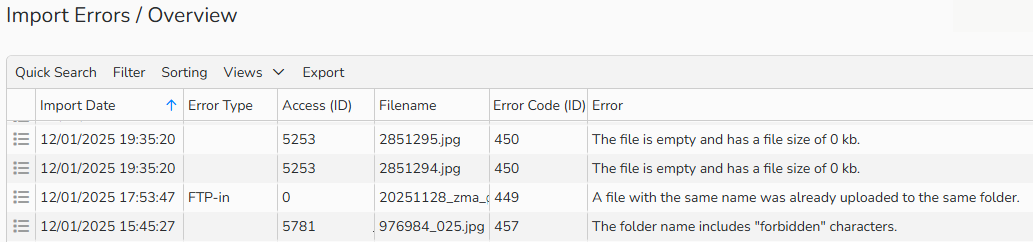
Import Error overview
Note
The integrated table functions allow you to search, filter, and sort records. For more information on these functions, as well as how to set up custom views and use the export function, see Advanced Table Views.